
Screen dimming
Dim your Mac below its lowest brightness
Press the brightness key all the way down and a dark room still feels bright. Sundown's Brightness slider keeps going past the point where macOS stops.
7-day free trial on the monthly and annual plans
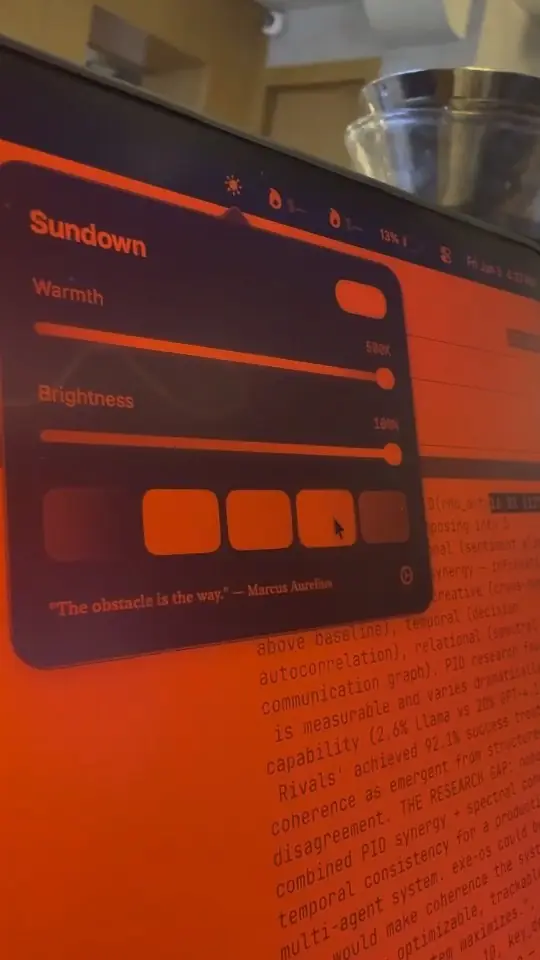
The lowest brightness on a Mac isn't that low
In a dark bedroom the bottom of the brightness keys is still a glowing rectangle. macOS won't take you any lower without switching the screen off.
With the brightness keys
- The darkest setting is still too bright in a dark room
- One more press and the screen goes black
- Brightness and warmth live in different places
With Sundown
- A Brightness slider that goes darker than macOS does
- Dimming in software, so the screen stays on and readable
- Warmth and brightness together in one menu bar panel
- An optional keyboard shortcut that dims and warms together
How it works
Darker in a few seconds
- 1
Open the panel
Click the Sundown icon in your menu bar.
- 2
Lower the Brightness
Drag the Brightness slider down. Past your Mac's own minimum, Sundown keeps dimming.
- 3
Add some warmth
A dim screen is easiest on a dark room when it's warm too, so slide the Warmth toward red.
What you get
Dimming that keeps going
Below the floor
Sundown dims through the display's colour table, so it can go darker than the backlight's lowest step.
Next to the warmth
Brightness sits right under Warmth in the same panel, so you set both in one place.
On your keys, if you like
Turn on Replace Brightness Keys in Settings and F1 and F2 control Sundown's dimming instead.
One shortcut for both
Record a Comfort modifier in the Keyboard tab, then hold it and press F1 to dim and warm the screen together.
Late at night
Dim and warm, together
Most nights the comfortable setting is somewhere low on both sliders. Sundown keeps them side by side so getting there takes a second.
Weighing up dimmer apps?
We compared six screen dimmers for Mac on how far each one goes and what else it does.
Make your Mac darker tonight
$4.99 a month, $39 a year, or $79 once for a Lifetime licence that works on 2 Macs. Every feature on this page is in every plan.
7-day free trial on the monthly and annual plans
Questions
Screen dimming questions
How can Sundown go darker than my Mac's lowest setting?
Your Mac's brightness keys control the backlight, which has a floor. Sundown dims what the screen shows instead, through the display's colour table, so it can keep going below that floor.
Will the screen ever go fully black?
No. Sundown's dimming stops before black, so you can always see enough to bring it back up.
Can I use the brightness keys for this?
Yes. Turn on Replace Brightness Keys in Sundown's Keyboard settings, and F1 and F2 control Sundown's dimming. macOS asks for Accessibility permission the first time.
What is the Comfort shortcut?
It's an optional shortcut you record in the Keyboard tab. Hold it with F1 and the screen dims and warms in one move, and with F2 it brightens and cools. It's off until you set it, and it needs Replace Brightness Keys switched on.