Last Updated: July 2026
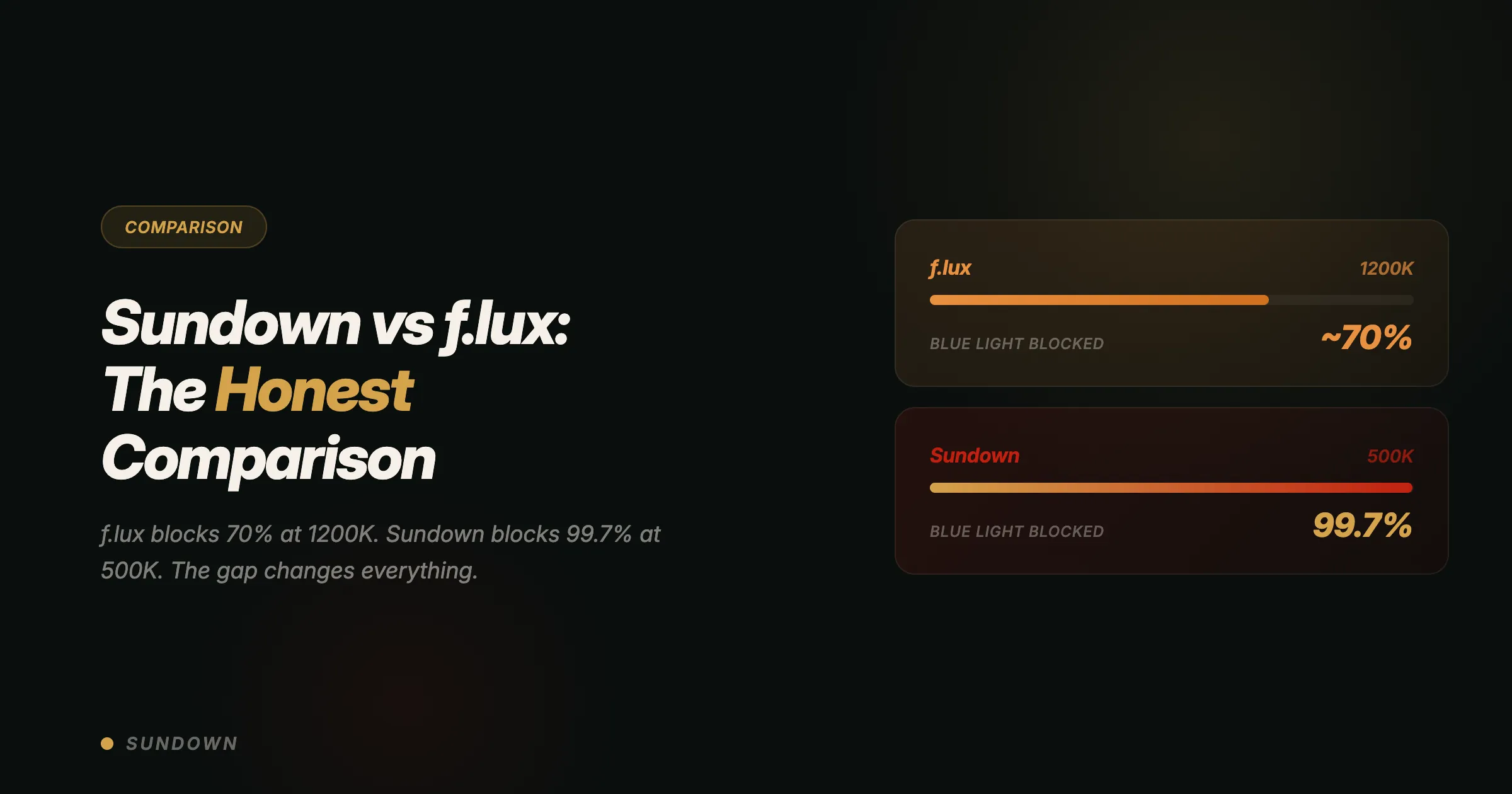
The best f.lux alternative for Mac in 2026 is Sundown. It reaches 500K color temperature compared to f.lux's 1200K ceiling, includes a flicker-free mode and Apple Silicon anti-dithering that f.lux lacks. f.lux invented the category and remains a solid free option. f.lux still ships — its Windows build is dated 8 April 2026. The Mac build hasn't changed since 17 May 2023. The hardware and the science have both moved on since then.
I used f.lux for seven years. Installed it the week I got my first MacBook in 2016, dragged the slider to the warmest setting, and forgot about it. It turned my screen amber every evening. I assumed that was enough.
Then I started working on blue light blocking glasses and measuring spectral output with a spectrometer. And I realized f.lux stops at 1200K — warm, but nowhere near red. Every single night.
That realization is why Sundown exists. Not because f.lux is bad — it invented this category and deserves permanent credit. But the science has moved past what f.lux offers, the hardware has changed underneath it, and the Mac app has stood still. f.lux still ships — its Windows build is dated 8 April 2026. The Mac build hasn't changed since 17 May 2023.
This is the honest comparison. What each app does, what it doesn't, and why the gap between 1200K and 500K matters more than the numbers suggest.
Sundown vs f.lux: The Numbers That Matter
Sundown reaches 500K color temperature versus f.lux's 1200K, includes a flicker-free mode and anti-dithering that f.lux lacks. f.lux is free and offers per-app color controls that Sundown doesn't yet have. Both target evening screen use — the difference is filtering depth and how each app handles the display hardware.
Before the context, here's the raw comparison.
| Feature | Sundown | f.lux |
|---|---|---|
| Deepest color temperature | 500K | 1200K |
| Flicker-free (gamma) dimming | Yes | No |
| Anti-dithering (Apple Silicon) | Yes | No |
| Gradual transitions | Custom time-of-day steps | 20s to 60min |
| Presets | 8 Kelvin presets | 3 (Day / Sunset / Bedtime) |
| Keyboard shortcuts | Configurable (click-to-record) | Fixed |
| Scheduling | Custom time-of-day schedule | Yes |
| Last major update | Actively maintained | Mac build: 17 May 2023 |
| Price | $4.99/mo, $39/yr, or $79 lifetime | Free |
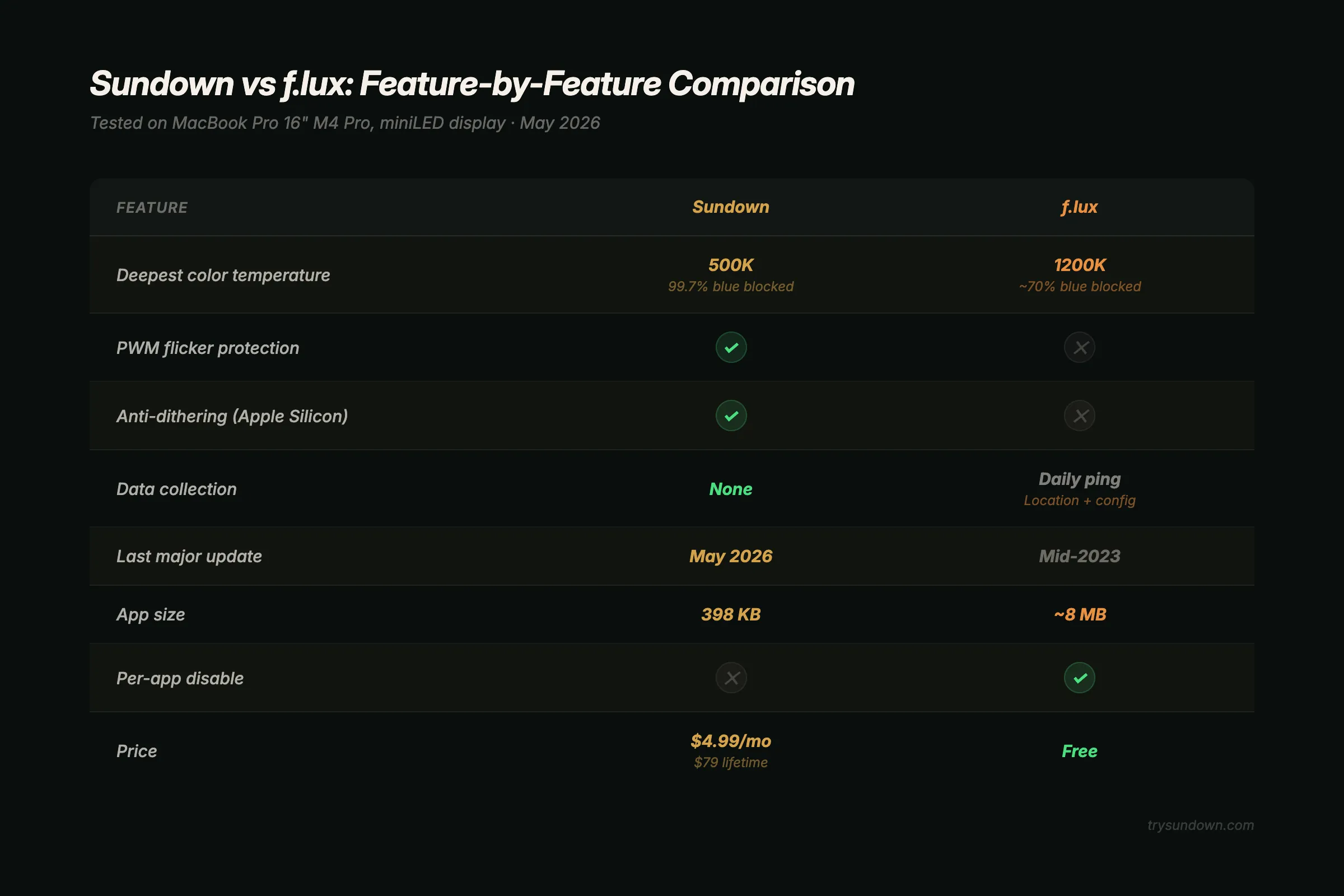
f.lux is free. Sundown is not. That's a real consideration, and I won't pretend otherwise. The question is whether what Sundown does beyond f.lux is worth anything to you. Let's walk through each difference so you can decide with actual information.
The 1200K vs 500K Gap: Why Depth Changes Everything
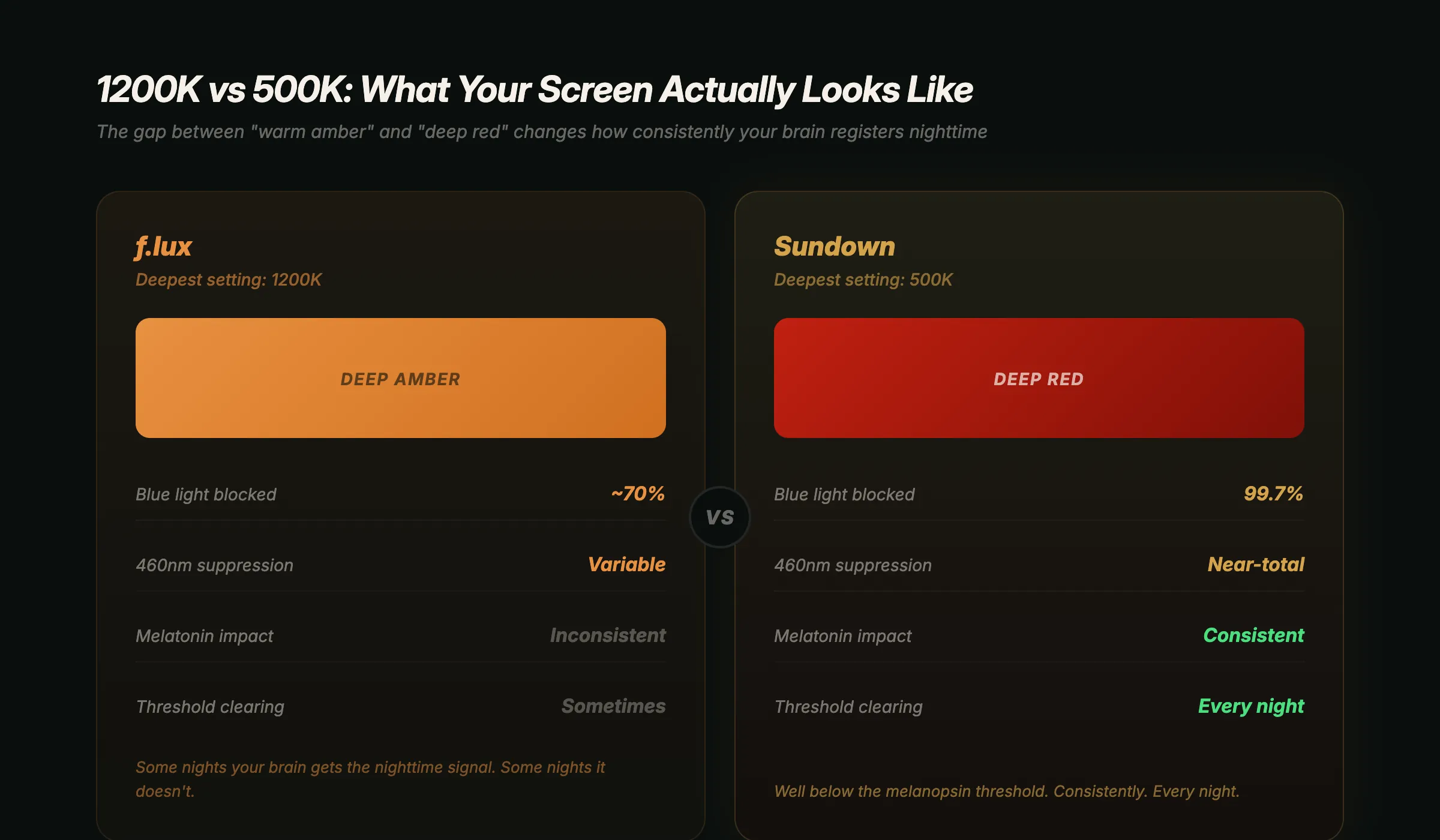
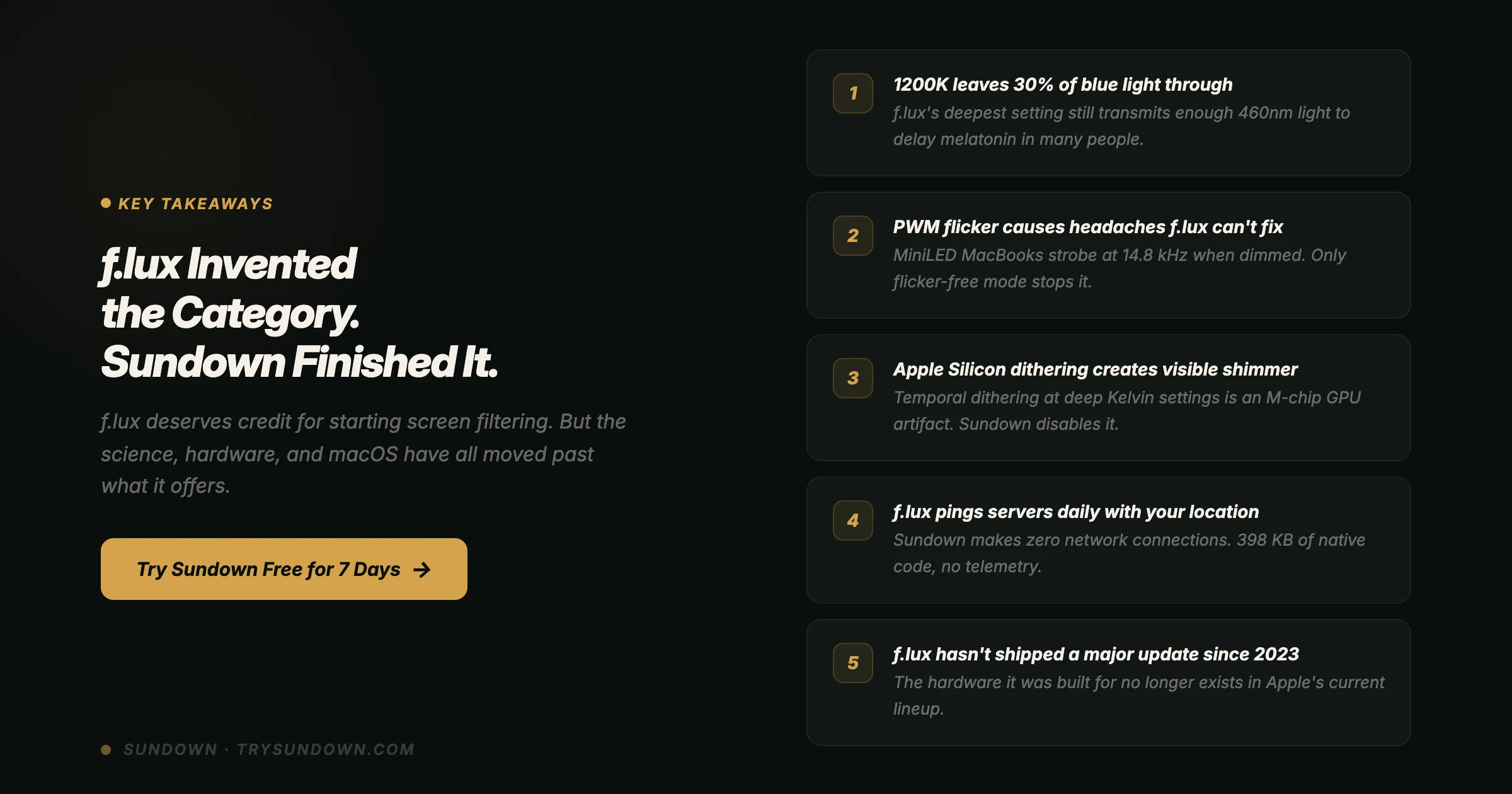
f.lux's deepest setting is 1200K. Sundown reaches 500K. That 27-point gap crosses the threshold where your circadian system stops registering "daytime" — the difference between inconsistent and consistent melatonin protection every evening.
At 1200K, your Mac screen turns a warm amber. Like looking through a pint of honey ale held up to a candle. It's pleasant. It's noticeably warmer than Night Shift's 2700K ceiling. And it stops well short of red — leaving the 460nm band, the exact wavelength your melanopsin receptors use to tell your brain whether it's daytime.
At 500K, your screen turns deep red. Think dying embers, not candlelight. At this depth the gamma table passes red only. Your display is emitting almost exclusively long-wavelength red light that melanopsin doesn't respond to.
That gap isn't marginal. Dr. Steven Lockley and colleagues at Harvard Medical School demonstrated in a 2003 study published in the Journal of Clinical Endocrinology & Metabolism that 460nm blue light suppresses melatonin production at twice the rate of 555nm green light. Your circadian system doesn't respond linearly — it responds to threshold crossings. Below a certain blue light exposure, your brain registers "nighttime." Above it, your brain registers "still daytime, delay melatonin."
At 1200K, many people sit right at that threshold. Some nights your brain gets the message. Some nights it doesn't, depending on room lighting, screen brightness, and how long you've been staring. At 500K, you're well below the threshold. Consistently. Every night.
A 2025 study in Nature Scientific Reports confirmed this: unfiltered high-blue-content lighting suppressed melatonin more than amber-filtered conditions did. Partial filtering produced inconsistent results across participants. Deep filtering produced consistent protection.
That's the core argument for going past 1200K. f.lux helps. But "helps sometimes" and "helps consistently" are different categories when your sleep is at stake.
PWM Flicker: The Problem f.lux Can't See
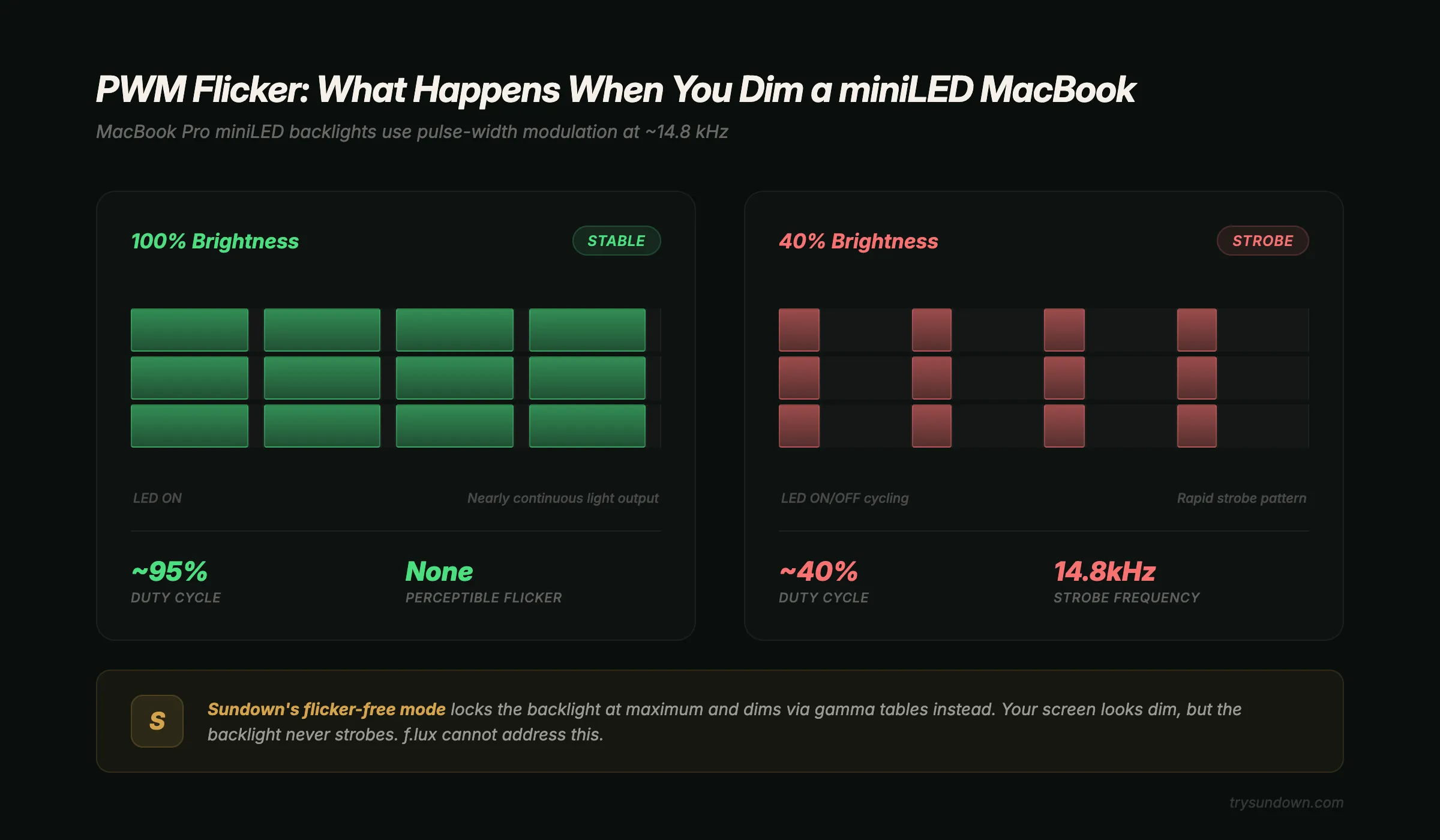
MacBook Pro miniLED displays control brightness by switching the backlight on and off far faster than you can see, and the dimmer the screen, the longer the off part of each cycle. f.lux cannot address this because it only modifies color temperature, not backlight behavior. Sundown's flicker-free mode holds the backlight at full power and dims through the gamma table instead, so dimming does not rely on the backlight's PWM.
If you use a MacBook Pro with a miniLED display (any model from 2021 onward), your backlight controls brightness through pulse-width modulation. The LEDs behind your screen don't dim continuously — they switch on and off thousands of times per second. At full brightness, they're on nearly 100% of the time. At 40% brightness, they're off more than they're on.
This happens far too fast to see consciously. People who are sensitive to flicker still report headaches, eye strain, and a vague visual discomfort that builds as the evening goes on, which is exactly when you're dimming the screen with a blue light filter.
f.lux adjusts your display's color temperature. That's all it touches. It has no mechanism to modify backlight behavior because it was designed in 2009 when MacBook backlights were uniform LED arrays without local dimming zones. The hardware f.lux was built for no longer exists in Apple's current lineup.
Sundown includes a flicker-free mode that holds your MacBook's hardware backlight at full power and dims the screen through the gamma table instead, so dimming does not rely on the backlight's PWM. Your screen can look as dim as you want while the backlight itself stays at full output.
If your evening headaches started around the same time you got a MacBook Pro with miniLED, and they happen most often when your screen brightness is low, PWM is worth ruling out. It's also something f.lux cannot touch regardless of how deep you set the color temperature. For more on this, read our full guide on fixing screen flicker headaches on MacBook.
Apple Silicon Dithering: The Shimmer at Deep Settings
Apple Silicon GPUs use temporal dithering to simulate colors they cannot render exactly — visible as a crawling shimmer at deep color temperatures like f.lux's 1200K. f.lux has no mechanism to address this. Sundown communicates with the display coprocessor through IOKit to disable temporal dithering, producing a clean, stable deep-red screen without pixel noise.
Every Mac with an M-series chip produces temporal dithering — the GPU alternates pixel color values frame-by-frame to simulate colors it can't render exactly. At normal color temperatures, you'd never notice. At deep warm settings like f.lux's 1200K, the limited color palette makes the dithering visible as a crawling, sand-grain shimmer across your entire display.
I noticed it the first week I started testing deep color temperatures during Sundown development. Thought my display was defective. Tested three different MacBooks. Same shimmer on all of them. It's not a defect — it's how Apple Silicon GPUs handle temporal dithering at extreme color values.
f.lux doesn't acknowledge this because f.lux predates Apple Silicon. The codebase was mature before M1 shipped. The shimmer exists whether or not f.lux knows about it.
Sundown communicates directly with the display coprocessor through IOKit to disable temporal dithering. The shimmer stops. Your deep red screen looks clean and stable instead of subtly noisy. It's one of those things you don't realize was bothering you until it's gone.
Privacy: What Leaves Your Mac
This comparison makes no network privacy claim for either app. We have not independently verified what f.lux or Sundown sends, and a privacy promise you can't check is worth little. What we can describe is how each one decides when to warm your screen.
f.lux uses your location to work out local sunrise and sunset times, then warms your screen to follow them.
Night Shift does something similar with your Mac's location services and its Sunset to Sunrise schedule. Sundown works differently. You pick the warmth from the menu bar, and you can also build a custom schedule by time of day.
If network behavior matters to you, the Network tab in Activity Monitor shows what each app on your Mac sends and receives, so you can check any utility for yourself.
If you chose a Mac partly because of Apple's privacy stance, that check is worth doing for every small utility you run, not only this one.
The Update Question: Active vs Stale
f.lux still ships — its Windows build is dated 8 April 2026. The Mac build hasn't changed since 17 May 2023. That build predates macOS Sequoia, macOS 26 and M4 hardware. Sundown is actively maintained and tested on Apple's current hardware. For an app that modifies display hardware, active maintenance is a reliability requirement, not a luxury.
The Mac app still runs and still shifts your screen color. But it hasn't been rebuilt for macOS Sequoia's display APIs or the macOS 26 design language. The company itself is active and its Windows build keeps moving. It is the Mac binary that has stood still.
For most apps, three years without an update is fine. For an app that modifies display hardware — an area Apple changes with nearly every macOS release — it's a reliability question. f.lux works through compatibility layers rather than native integration with current APIs. Sundown is actively maintained and tested on M4 hardware.
What f.lux Still Does Better
f.lux wins in two areas: price (genuinely free, no trial or freemium) and per-app color control (movie mode disables filtering for specific applications). Sundown costs $4.99/month, $39/year, or $79 lifetime and currently uses a global toggle. Neither advantage changes the core differences in filtering depth, dimming and dithering — but both are real and worth knowing.
Honest comparison means acknowledging where f.lux wins. Two areas.
Price. f.lux is free. Genuinely free, no trial, no freemium upsell. If your budget is zero and you want warmer screen colors after sunset, f.lux delivers that with no financial commitment. Sundown costs $4.99/month, $39/year, or $79 for a lifetime license. The 7-day free trial lets you test everything before paying, but f.lux wins the price comparison outright.
Per-app disable. f.lux has a "movie mode" that temporarily disables filtering for specific applications — useful when you're color grading photos or watching a film where accurate color matters. Sundown doesn't have per-app controls yet. Right now, disabling Sundown is a global toggle. If you frequently switch between creative work and regular use in the evening, f.lux handles that transition more smoothly today.
Both are real advantages. Neither changes the core differences in filtering depth, dimming and dithering. But pretending they don't exist would make this comparison less useful to you.
Who Should Stay With f.lux
f.lux is the right choice if your budget is zero, you don't use a MacBook Pro with miniLED, you don't notice dithering shimmer, and you sleep well at 1200K. It's also the better option if per-app color control is critical — photographers and video editors who need accurate colors during evening sessions get more flexibility from f.lux's movie mode than from Sundown's current global toggle. For a broader look at alternatives, including Night Shift and Iris, see our Mac display health app comparison.
Who Should Switch to Sundown
Sundown is the right choice if any of these are true for you:
- You still can't sleep well despite using f.lux. What f.lux still lets through at 1200K can be enough to delay melatonin onset in people with moderate to high circadian sensitivity. Going to 500K eliminates the variable.
- You want dimming that doesn't lean on the backlight's PWM. On a dimmed MacBook Pro, the backlight spends more of each cycle switched off. f.lux can't change that. Sundown's flicker-free mode holds the backlight at full power and dims through the gamma table instead.
- You notice a shimmer or crawling grain on your display at warm settings. That's Apple Silicon temporal dithering. Sundown disables it. f.lux doesn't address it.
- You want to set the warmth yourself. Sundown sits in the menu bar with a Kelvin ladder from 6500K down to 500K and eight presets, so you decide exactly how warm the screen gets.
- You want an app that's actively maintained for current macOS. Sundown is actively maintained and tested on M4 hardware. f.lux still ships — its Windows build is dated 8 April 2026. The Mac build hasn't changed since 17 May 2023.
If more than one of those applies, the difference will be obvious within the first evening. Start your 7-day free trial and run Sundown at 800K for a night. Then try 500K. Then go back to f.lux at 1200K. The gap speaks for itself. If you're specifically looking for a Night Shift alternative that goes deeper, that guide walks through why Apple's built-in filter stops at roughly 2700K and what to do about it.
How to Switch From f.lux to Sundown
Switching takes under sixty seconds: download the app from trysundown.com, quit f.lux, pick a preset or a custom color temperature, enable flicker-free mode if you have a miniLED MacBook Pro, and uninstall f.lux when ready. The 7-day free trial on the monthly and yearly plans includes every feature.
Sixty seconds, five steps:
- Download Sundown from trysundown.com. Open the download and drag it into Applications.
- Quit f.lux from its menu bar icon.
- Open Sundown. Pick a preset or set a custom color temperature. Start at 1200K if that's what you're used to, then experiment deeper.
- Enable flicker-free mode if you use a MacBook Pro with miniLED. Enable anti-dithering if you see pixel shimmer at deep settings.
- Uninstall f.lux when you're ready. Drag to Trash. No daemon to remove.
The 7-day trial gives you full access to every feature. Most f.lux switchers settle between 800K and 500K within the first week.
The Science Behind Going Deeper Than 1200K
Three peer-reviewed studies confirm that partial blue light filtering (like f.lux at 1200K) produces inconsistent sleep improvements, while deeper filtering produces more consistent melatonin protection. The threshold is biological, not linear — going from 1200K to 500K crosses the point where your circadian system reliably registers "nighttime" instead of guessing.
The case for deep filtering isn't marketing — it's photobiology. Three studies frame why the gap between 1200K and 500K matters physiologically:
Chang et al. (2014), PNAS: This Brigham and Women's Hospital study found screen users took longer to fall asleep, experienced reduced REM, and felt groggier the next morning — even after sleeping the same total hours. Circadian timing shifted by approximately 90 minutes. Partial filtering reduces the shift but doesn't eliminate it reliably.
Gooley et al. (2011), JCEM: Dr. Joshua Gooley at Harvard Medical School showed that ordinary room light in the evening suppressed melatonin and delayed its onset. The critical insight: suppression follows a threshold curve, not a linear one. Below a certain short-wavelength intensity, suppression drops off sharply. This is why going from 1200K to 500K produces a much larger perceived effect than the numbers suggest.
For the complete reference list, including a Cochrane review and a double-blind trial whose melatonin result was not significant (PMID 28017916), see the Sundown science page.
Frontiers in Neurology (2025): A systematic review of 10 RCTs covering 266 participants found inconsistent results from blue light blocking — partly because filter quality varied enormously. Interventions using deep filtering showed clear sleep improvements. Shallow filtering showed no effect. Depth matters.
f.lux's 1200K puts you in the zone where outcomes are variable. Sundown's 500K puts you in the zone where outcomes are consistent. That's the functional difference the science supports.
Frequently Asked Questions
Is f.lux safe to use on macOS in 2026?
f.lux runs on macOS Sequoia and macOS 26 through compatibility layers. f.lux still ships — its Windows build is dated 8 April 2026. The Mac build hasn't changed since 17 May 2023. Users on M3 and M4 MacBooks occasionally report display profile conflicts. It functions, but it's running on inertia rather than active macOS integration. There are no known security concerns — the risk is compatibility degradation, not safety.
Can I run Sundown and f.lux at the same time?
Not recommended. Both modify your display's gamma table. Running them simultaneously produces unpredictable color output because each app overwrites the other's adjustments. If you want to compare, alternate — use f.lux for a few days at its deepest setting, then switch to Sundown. The difference in depth and display stability will be immediately apparent.
Why does Sundown cost money when f.lux is free?
f.lux is free for personal use. Sundown is paid for directly. The features that cost money to develop and maintain — PWM flicker-free mode, anti-dithering, deep color temperature control below 1200K, and ongoing macOS compatibility — are capabilities f.lux doesn't offer. The 7-day free trial lets you test everything before deciding.
What if I only use my Mac during the day?
If you close your laptop before sunset consistently, you probably don't need either app. Blue light during daytime hours is beneficial — it supports alertness, mood, and circadian rhythm synchronization. Blue light filters are specifically for evening and nighttime use, when short-wavelength light disrupts melatonin production.
Does Sundown work with external monitors?
Yes. Sundown's blue light filtering and anti-dithering apply to all displays connected to your Mac. The flicker-free mode specifically targets the MacBook's built-in miniLED backlight, since external monitors have their own backlight controllers that macOS cannot access. Color temperature filtering works across every connected screen.
Is there a free alternative that matches Sundown's 500K depth?
No. The deepest free option is f.lux at 1200K. Night Shift caps at roughly 2700K. No free Mac app reaches below 1200K for blue light filtering. Sundown's 7-day free trial is the lowest-cost way to test clinical-grade filtering depth on macOS.
For a broader look at every option available, read our full Mac display health app roundup. For the Night Shift vs f.lux comparison specifically, see our dedicated breakdown. For the four-app deep dive covering Iris and Circadian Shield alongside Sundown and f.lux, see our best blue light app for Mac guide. And if flicker headaches are your main concern, our guide on how to reduce eye strain on Mac covers all seven root causes, not just blue light. You can also learn how to add a proper blue light filter to your MacBook beyond what Night Shift offers.
Protect your screen tonight.
7-day free trial on the monthly and annual plans. Warmth down to 500K.
Try Sundown Free