Last Updated: September 2026
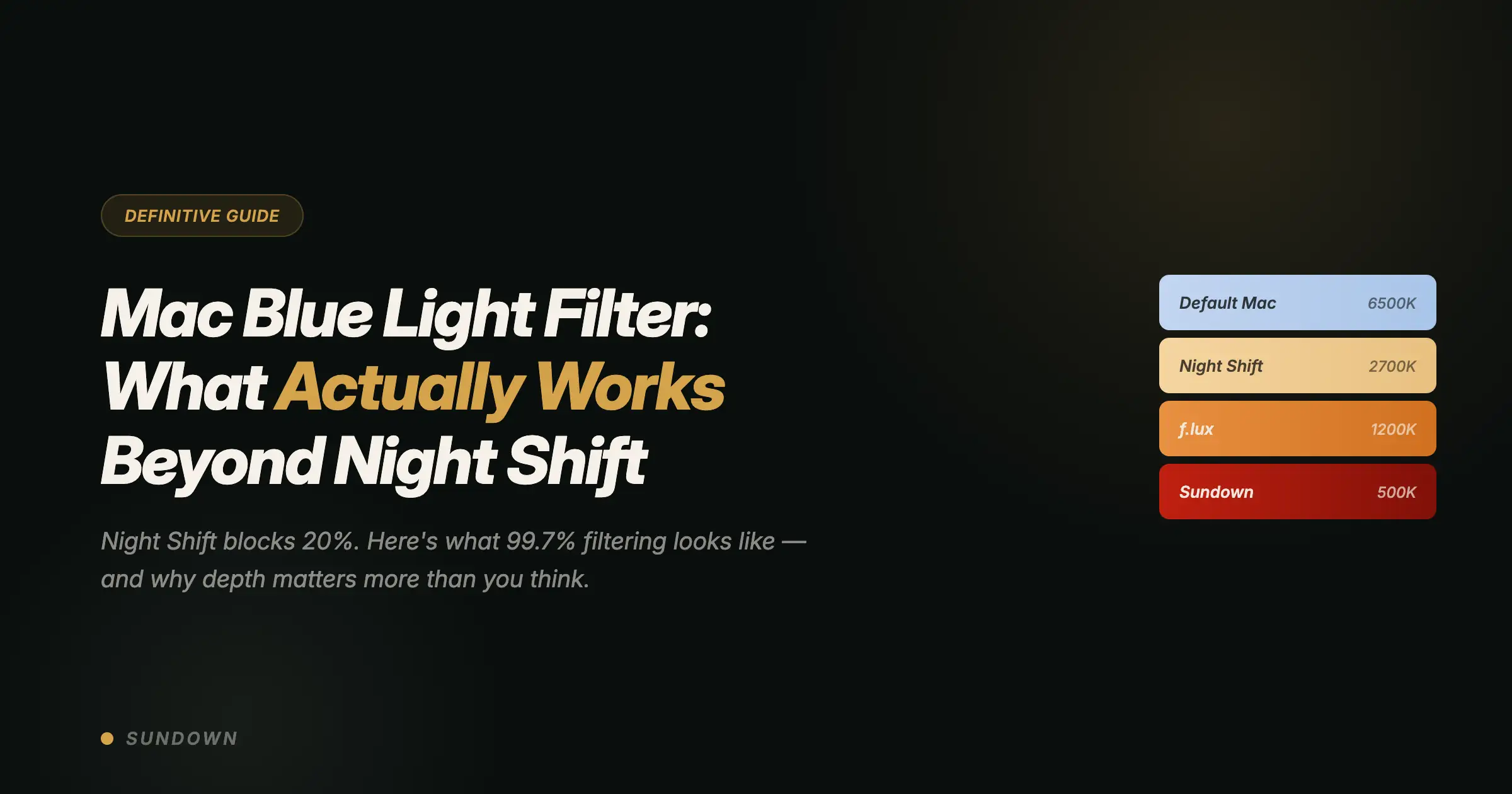
To add a blue light filter on your Mac, you have three real options: Night Shift (built-in, roughly 2700K), f.lux (free download, 1200K), or Sundown (500K, with flicker-free gamma dimming). Night Shift is the fastest to enable — two clicks in System Settings. But Dr. Charles Czeisler's research at Harvard Medical School shows that blue light suppresses melatonin at twice the rate of other wavelengths, and a 2700K floor barely moves the needle. Below, I walk through how to set up each method step by step, what each one actually blocks at the 460nm wavelength your circadian system cares about, and which one is worth your time.
How Does a Blue Light Filter Work on Mac?
A Mac blue light filter shifts your display's color temperature from its default 6500K (cool daylight white) toward warmer tones. The lower the Kelvin number, the less blue light reaches your eyes. Your Mac's LED backlight peaks at exactly 450-460nm — the precise wavelength range where melanopsin, the photopigment in your retinal ganglion cells, is most sensitive.
Dr. Steven Lockley, Dr. George Brainard, and Dr. Charles Czeisler demonstrated in a 2003 study in the Journal of Clinical Endocrinology & Metabolism that 460nm light suppresses melatonin at twice the rate of 555nm green light. Your Mac is, by default, a melatonin suppression machine after dark. A blue light filter macbook solution shifts the output away from that 460nm danger zone.
That paper is PMID 12970330. We keep it, and the studies that cut against blue-light products, on the Sundown science page.
The critical question: how far does it shift? Night Shift stops at 2700K. f.lux reaches 1200K. Sundown goes to 500K. The difference between those numbers is the difference between your brain thinking it's late afternoon and understanding it's nighttime.
Method 1: Night Shift (Built-In, Free — ~2700K Floor)
Night Shift is Apple's built-in blue light filter for Mac. It's already on your machine. Zero installation, zero cost, two clicks to enable.
How to set up Night Shift on Mac:
- Open System Settings (click the Apple menu → System Settings)
- Click Displays in the sidebar
- Click the Night Shift tab
- Set Schedule to "Sunset to Sunrise"
- Drag the Color Temperature slider all the way to "More Warm"
That's it. Your Mac will now shift to 2700K — roughly the color temperature of a warm incandescent bulb — from sunset to sunrise.
What Night Shift gets right: It's free, automatic, and requires zero maintenance. For someone who shuts their laptop by 9 PM and reads a book before bed, it provides a mild benefit.
What Night Shift misses:
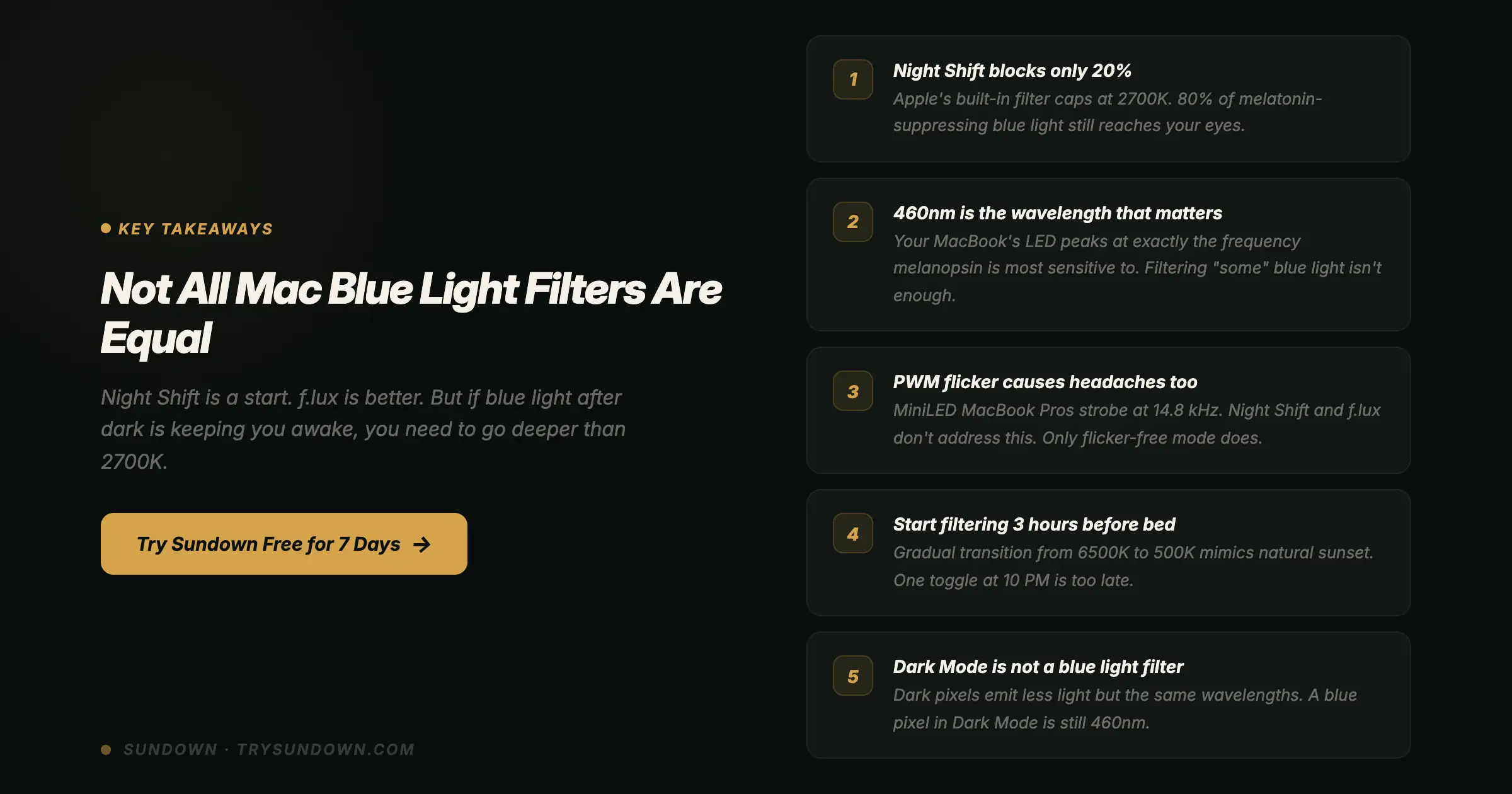
- Stops at roughly 2700K. Much of the melatonin-suppressing 460nm band still reaches your retinas. In the National Sleep Foundation's 2022 Sleep in America Poll, 58% of US adults said they often look at screens in the hour before bed. For these users, Night Shift is a psychological comfort blanket, not circadian protection.
- No gradual transition. Natural light fades over two to three hours. Night Shift snaps from 6500K to 2700K at the scheduled time. Your circadian system expects a gradient, not a switch.
- No PWM flicker protection. MacBook Pro miniLED displays control brightness by switching the backlight on and off far faster than you can see. At low brightness — exactly when you'd use a blue light filter — the invisible flicker that causes MacBook headaches intensifies. Night Shift doesn't address this.
- Locked at 2700K maximum. You cannot go deeper. Want to make your Mac night mode darker? You need a third-party tool.
Verdict: Night Shift is the seatbelt-level protection of blue light filtering. Better than nothing. Not designed for serious impact protection.
Method 2: f.lux (Free Download — 1200K Floor)
f.lux invented this category in 2009. On macOS, it reaches 1200K — a deep amber. That's a meaningful step up from Night Shift's 2700K.
How to set up f.lux on Mac:
- Download f.lux from justgetflux.com
- Open the .dmg and drag f.lux to your Applications folder
- Launch f.lux — it will ask for your location (for sunset/sunrise times)
- Click the f.lux menu bar icon → Preferences
- Set "Bedtime" to 1200K (drag the slider to the warmest setting)
- Set "Sunset" to around 2700K-3400K for a gradual ramp
What f.lux gets right: Free, deeper than Night Shift, sophisticated scheduling with separate sunrise, sunset, and bedtime presets. At 1200K, it genuinely reduces blue light enough for many users to notice improved sleep onset.
What f.lux misses:
- A Mac build that has stood still. f.lux still ships — its Windows build is dated 8 April 2026. The Mac build hasn't changed since 17 May 2023. The core filtering works, but f.lux doesn't address PWM flicker or temporal dithering — hardware problems introduced by Apple Silicon and miniLED panels that didn't exist when f.lux was built.
- Some of the signal still gets through. A randomized crossover trial in PNAS found that evening screen reading pushed dim-light melatonin onset more than 1.5 hours later (Chang et al., 2015). At 1200K, your melanopsin receptors still detect enough signal to delay sleep. For more on how f.lux compares head-to-head with Apple's option, read our Night Shift vs f.lux breakdown.
Verdict: f.lux at 1200K is a real upgrade from Night Shift. If you want a free option deeper than Apple's default, this is it. Just know the science has moved past what it offers.
Method 3: Sundown (500K Deep Red — The Deepest Option on Mac)
Sundown reaches 500K — a color temperature so deep your screen turns campfire red. At this setting, the blue channel is driven to zero. Your display emits almost pure long-wavelength red light, the kind melanopsin doesn't respond to.
How to set up Sundown on Mac:
- Go to trysundown.com and start your 7-day free trial
- Download the .dmg
- Open the .dmg and drag Sundown to Applications
- Launch Sundown — it appears in your menu bar
- Click the Sundown icon → adjust Warmth to your comfort level (500K for maximum protection)
- If you like, you can also build a custom schedule by time of day
- Toggle Flicker-Free to hold the backlight at full power and dim through the gamma table instead
What Sundown gets right — and why it wins:
- 500K deep red at 500K. This is what circadian researchers use in laboratory protocols for evening light conditions. Dr. Joshua Gooley at Harvard Medical School found in a study in the Journal of Clinical Endocrinology and Metabolism that ordinary room light in the evening suppresses melatonin and delays its onset. At 500K, you're below the melanopsin activation threshold.
- Flicker-free mode. Holds the backlight at full power and dims through the gamma table instead, so dimming on a miniLED MacBook Pro does not rely on the backlight's PWM.
- Anti-dithering mode. Stops the per-pixel shimmer that Apple Silicon GPUs produce through temporal dithering.
- Eight Kelvin presets. Pick the warmth you want from the menu bar, from daytime white all the way down to 500K.
- A custom schedule. You can also build a custom schedule by time of day instead of relying on a single sunset switch. Your circadian rhythm anchors to when you get up, not only to when the sun sets.
Verdict: Sundown is the blue light filter macbook users need when they discover Night Shift and f.lux aren't enough. It goes where nothing else does.
Side-by-Side Comparison: All 3 Mac Blue Light Filter Methods
| Feature | Night Shift | f.lux | Sundown |
|---|---|---|---|
| Minimum color temperature | 2700K | 1200K | 500K |
| Flicker-free (gamma) dimming | No | No | Yes |
| Anti-dithering | No | No | Yes |
| Gradual transition | No (instant snap) | Yes (3 presets) | Custom time-of-day schedule |
| Brightness control | No | Limited | Yes (gamma-based) |
| Setup time | 2 clicks | 5 minutes | 3 minutes |
| Price | Free | Free / $20 | $4.99/mo, $39/yr, or $79 lifetime |
For a deeper comparison including Iris and CircadianShield, see our best blue light app for Mac roundup.
The Optimal Blue Light Filter Schedule for Mac
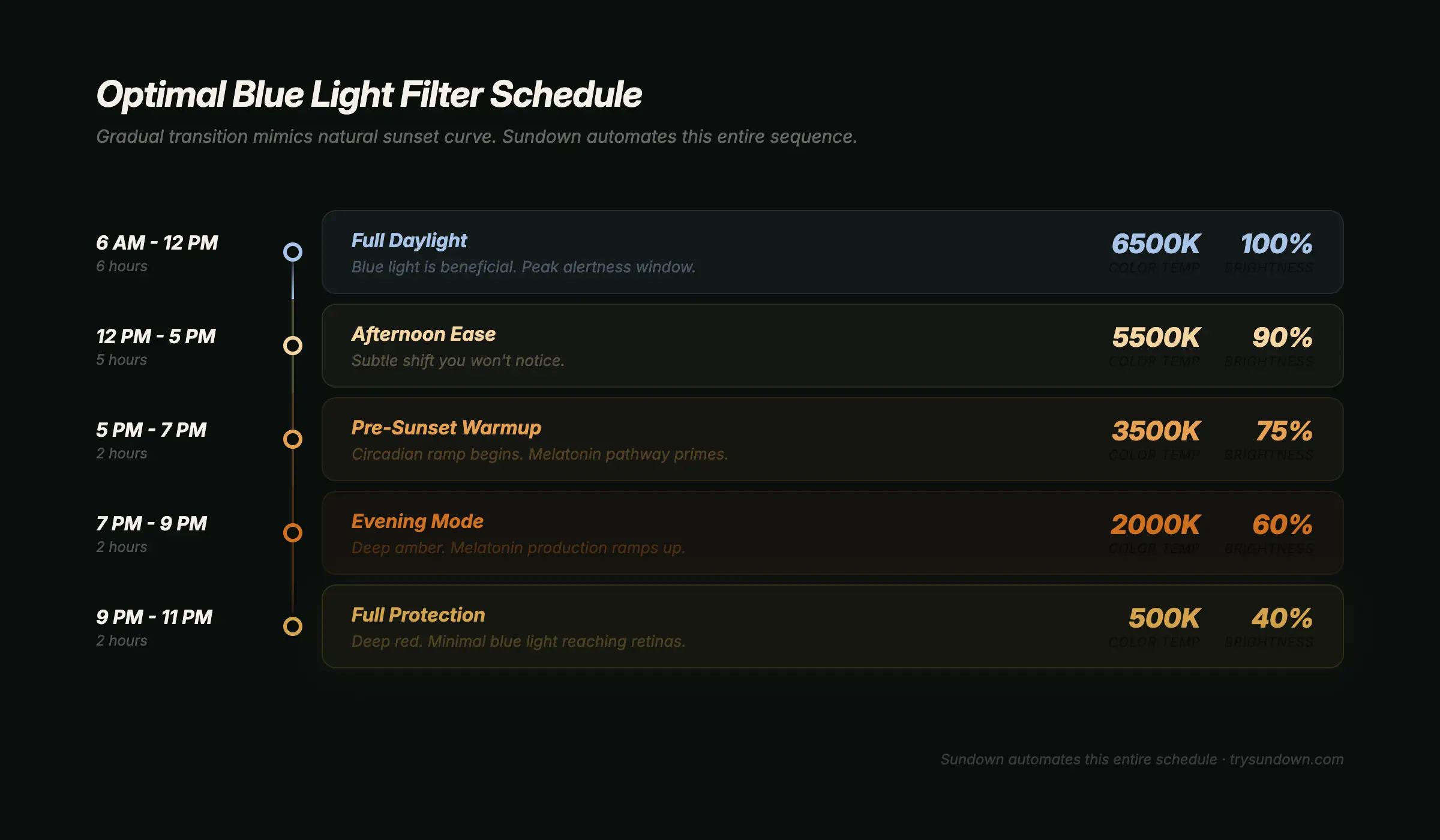
Regardless of which Mac blue light filter you choose, timing matters as much as depth. Dr. Anne-Marie Chang's 2014 PNAS study at Brigham and Women's Hospital found that screen users took longer to fall asleep, had less REM sleep, and felt groggier the next morning — even after sleeping the same number of hours. Their circadian rhythms had shifted by approximately 90 minutes.
Start your filter two to three hours before bedtime, not at the moment you want to sleep. A gradual ramp mimics natural light fade. Here's the schedule I run:
| Time | Color Temp | Brightness | What Happens Biologically |
|---|---|---|---|
| 6 AM - 12 PM | 6500K | Daylight | Blue light supports alertness. No filter needed. |
| 12 PM - 5 PM | 5500K | 90% | Subtle warm shift. Unnoticeable. |
| 5 PM - 7 PM | 3500K | Warm | Pre-sunset warmup. Circadian ramp begins. |
| 7 PM - 9 PM | 2000K | Amber | Melatonin production ramps up. |
| 9 PM - bedtime | 500K | Deep red | Full protection. Virtually zero blue light. |
Night Shift gives you one toggle. f.lux gives you three time zones. Sundown lets you build a custom schedule by time of day.
Does Dark Mode Count as a Blue Light Filter on Mac?
No. Dark Mode reduces total luminance — dark pixels emit less light than white ones — but it doesn't change the spectral composition. A blue pixel in Dark Mode emits the same 460nm wavelength as a blue pixel in Light Mode. Less total light is marginally better, but Dark Mode is not a blue light filter for Mac.
Worse, Dark Mode can intensify PWM flicker on miniLED MacBook Pros. The local dimming zones behind dark UI elements cycle through deeper on-off duty cycles. If your MacBook Pro bothers you specifically in Dark Mode at low brightness, PWM is worth ruling out. A flicker-free mode holds the backlight at full power and dims through the gamma table instead, so dimming does not rely on the backlight's PWM. Dark Mode alone makes one of the two flicker types worse.
What About Blue Light Blocking Glasses?
Glasses and screen filters are complementary, not competing. Clinical-grade lenses from companies like Ra Optics block most of the 400-500nm range and produce real results — in a randomized trial, amber lenses blocking blue light below 530nm significantly improved sleep quality and mood compared to clear controls (Burkhart and Phelps, 2009).
The advantage of glasses: they filter all blue light in the room, not just your screen. The disadvantage: you have to wear them. I use both — Ra Optics for ambient room light and Sundown as my Mac blue light filter for the display itself. The screen is the most intense point source of blue light in any room, so a dedicated filter eliminates the biggest contributor. For more on how blue light affects sleep on Mac, we break down the full science.
Which Mac Blue Light Filter Should You Choose?
If you close your laptop by 9 PM and sleep fine: Night Shift. Already on your Mac. Two clicks. A mild warm shift that's better than nothing.
If you work past 9 PM and notice your sleep is off: f.lux at 1200K. Free, its warmest preset, reasonable scheduling. It won't fix PWM flicker, and it hasn't been updated for modern Mac hardware, but the core filtering is solid. Looking for other options? We compared six f.lux alternatives for Mac.
If you're serious about circadian health, want dimming that doesn't lean on the backlight's PWM, or work late regularly: Sundown. 500K deep red, flicker-free mode, anti-dithering, eight Kelvin presets. 7-day free trial — see what 500K deep red actually feels like on your display tonight.
Frequently Asked Questions
Is Night Shift a good enough blue light filter for Mac?
Night Shift stops at roughly 2700K at its maximum 2700K setting. For casual users who shut their laptop two hours before bed, it provides a mild benefit. For anyone working past 9 PM, much of the melatonin-suppressing 460nm band still gets through. Sundown reaches 500K — the difference between a warm screen and a red one.
Does f.lux still work on macOS in 2026?
Yes. f.lux works on macOS and reaches 1200K. Its core filtering is effective. f.lux still ships — its Windows build is dated 8 April 2026. The Mac build hasn't changed since 17 May 2023. It doesn't address PWM flicker or temporal dithering on Apple Silicon Macs — hardware-level issues introduced after f.lux was designed.
Can a Mac blue light filter help with eye strain and headaches?
Color filtering reduces eye strain from blue light exposure, but headaches during evening Mac use are often caused by PWM flicker — invisible backlight strobing on miniLED MacBook Pros, far faster than you can see. A dedicated flicker-free mode, like Sundown's, holds the backlight at full power and dims through the gamma table instead, so dimming does not rely on the backlight's PWM. Night Shift and f.lux filter color but leave the backlight's PWM untouched. For the full breakdown, see our guide to fixing screen flicker headaches on MacBook.
What is the best free Mac blue light filter?
For free options, f.lux provides the deepest filtering at 1200K — significantly deeper than Night Shift's roughly 2700K. However, f.lux doesn't address PWM flicker. Night Shift is the lowest-effort option — already on your Mac, zero configuration, but limited to a roughly 2700K floor.
When should I turn on my Mac blue light filter?
Start two to three hours before your target bedtime — not at the moment you want to sleep. Research by Dr. Joshua Gooley at Harvard shows that ordinary room light in the evening suppresses melatonin and delays its onset. If you sleep at 11 PM, begin warming your display by 8 PM. Warming in steps mirrors the way natural light fades.
Does Sundown work on external monitors?
Yes. Sundown applies color temperature and brightness adjustments to all connected displays, including external monitors. The flicker-free mode specifically targets the MacBook's built-in miniLED backlight, but the blue light filtering works across every screen connected to your Mac.
Protect your screen tonight.
7-day free trial on the monthly and annual plans. Warmth down to 500K.
Try Sundown Free